
介绍
The Redragon K686 PRO is a high-performance 98-key mechanical gaming keyboard designed for versatility and an enhanced typing experience. It features a gasket-mounted structure, offering a softer and more consistent feel with reduced noise. With its advanced 3-mode connectivity, hot-swappable switches, and dedicated control knob, this keyboard provides extensive customization and convenience for both gaming and productivity across various operating systems.
包装内容
- Redragon K686 PRO 键盘
- USB 电缆
- 键帽/开关拔出器
- 备用开关(4 个)
- 用户手册
主要特点
垫片设计
The keyboard's body structure utilizes precision-locked covers with gaskets, differing from traditional screw fixing. This design assists with noise reduction and flexibility, providing even feedback and reducing rigid noise for a crisp, clean, and softer typing feel.

图片:爆炸图 view of the keyboard's internal structure, highlighting the gasket design and multiple noise-damp增强层。
3-Mode Connection
Equipped with Redragon's advanced tri-mode connection technology, the keyboard supports USB-C wired, BT 3.0/5.0, and 2.4Ghz wireless modes, offering versatile connectivity options for various devices and scenarios.

图片:侧面 view of the keyboard displaying the connectivity mode switches (2.4G, OFF, BT) and system compatibility switch (MAC, WIN).
Custom Mint Mambo Switches & Hot-Swap Sockets
The K686 PRO features thick-lubed custom linear Mint Mambo switches, providing cushioned, rich linear travel with silky, creamy, and cozy typing feedback. The brand new upgraded sockets are compatible with nearly all 3-pin and 5-pin switches, allowing for easy replacement and customization.
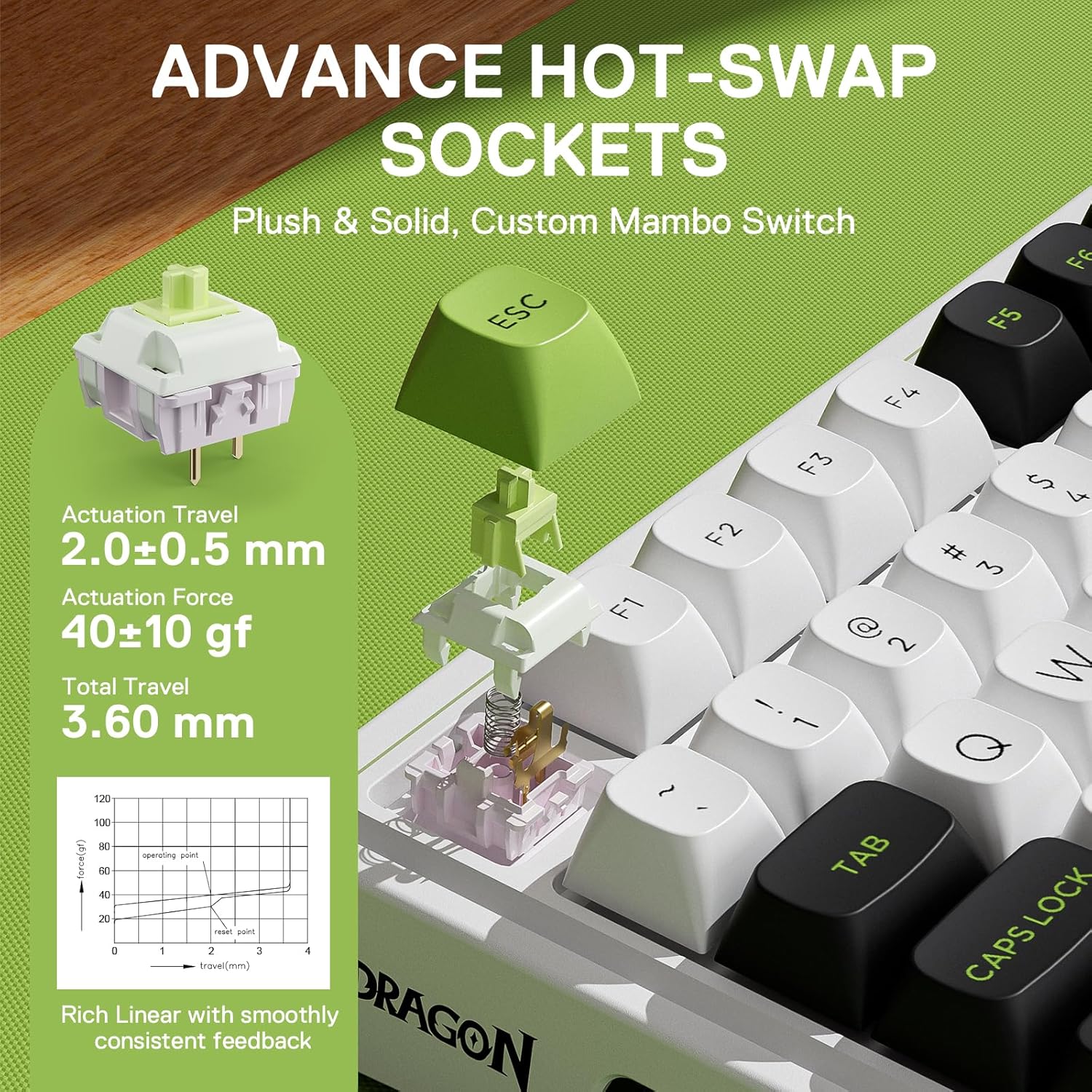
图片:详细 view of a Mint Mambo switch and the hot-swap socket, illustrating its specifications.
5层噪声Damp宁
Equipped with 3.5mm PO foam, IXPE switch foam, PET sound pad, bottom socket foam, and a silicone bottom pad along with the silicone gasket, this keyboard significantly reduces hollow noise, creating dampened and ultra-clean typing acoustics for a satisfying and comfortable keystroke.
Tactical 98 Keys Layout
The innovative 98-key design retains the functionality of a 100% layout while shrinking the size by 20% to provide more compactness, optimizing desk space without sacrificing essential keys.

图片:上方view of the Redragon K686 PRO keyboard, showing its 98-key compact layout.
One-Knob Control
The convenient easy-access control knob allows for hassle-free adjustment of keyboard backlight brightness and media controls (volume, play/pause, switch), providing intuitive control without extra keys or wasted space.

Image: Detail of the multi-function knob and its associated controls.
PBT圆形键帽
The keycaps are made from high-quality PBT material with a DSA round design. This provides a larger surface area for each key, making typing even more comfortable and ensuring long-lasting durability.

Image: Comparison of the PBT round keycaps with standard keycaps.
4000mAh电池
The keyboard is equipped with a 4000mAh battery, providing extended usage time in wireless modes.
Pro Software Supported
Expand your options using the available software to design your own new modes and effects. Create macros with different keybindings or shortcuts for more efficient work and gaming.

Image: Software interface for customizing RGB modes and macros.
设置指南
有线连接
Connect the keyboard to your computer using the provided USB-C cable. The keyboard will be automatically recognized and ready for use.
蓝牙连接
- Slide the connection switch on the side of the keyboard to 'BT'.
- 按住 FN + Q/W/E for 3 seconds to enter pairing mode. The indicator light will flash rapidly.
- On your device (PC, laptop, tablet), search for Bluetooth devices and select 'BT5.0 Keyboard' to connect. The indicator light will stop flashing once connected.
2.4GHz无线连接
- Slide the connection switch on the side of the keyboard to '2.4G'.
- Take out the USB receiver from its compartment on the right side of the keyboard.
- Plug the USB receiver into an available USB port on your computer. The keyboard will automatically connect.
Mac/Windows 布局切换
Use the dedicated switch on the side of the keyboard to toggle between Mac and Windows layouts for optimized key functionality on your preferred operating system.
图片:侧面 view of the keyboard displaying the system compatibility switch (MAC, WIN).
操作说明
旋钮控制
The dedicated knob on the top right corner allows for quick adjustments:
- 向左/向右旋转: 调节音量。
- 按下: 静音/取消静音音频。
RGB背光控制
The keyboard features vibrant RGB backlighting with customizable modes and effects. Use the following key combinations:
- 前线+INS: Cycle through RGB effects.
- FN + PGUP: Cycle through single colors.
- FN + ↑(向上箭头): 增加背光亮度。
- FN + ↓(向下箭头): 降低背光亮度。
- FN + →(右箭头): 提高效果速度。
- FN + ←(左箭头): 降低效果速度。
软件定制
For advanced customization, download the Redragon software from the official web本网站。该软件允许您:
- Reprogram key definitions.
- Create and manage in-game macros.
- 自定义灯光效果和颜色。
维护
键帽和开关更换
Use the included 2-in-1 keycap/switch puller to carefully remove keycaps and switches. Align new 3-pin or 5-pin switches with the hot-swap sockets and press firmly until seated. Replace keycaps by pressing them onto the switch stems.
打扫
Regularly clean your keyboard to maintain performance and appearance. Use a soft, dry cloth to wipe down the keycaps and chassis. For deeper cleaning, remove keycaps and use compressed air to clear debris from between switches.
故障排除
- 键盘无响应: Ensure the keyboard is charged. Check the connection mode switch (wired, BT, 2.4G). For wireless modes, ensure the receiver is properly plugged in or Bluetooth is paired. Try restarting your computer.
- 密钥未注册: If specific keys are not working, try removing and re-inserting the switch using the puller. Ensure the switch is fully seated.
- 蓝牙连接问题: Ensure no other devices are interfering. Try unpairing and re-pairing the keyboard. Ensure your device's Bluetooth is enabled and updated.
- RGB灯光不亮: Check brightness settings using FN + Up/Down Arrow. Ensure the keyboard is not in a mode that disables lighting.
规格
| 特征 | 细节 |
|---|---|
| 型号 | K686 PRO MAX |
| 连接技术 | 2.4GHz 频段、蓝牙、USB-C 接口 |
| 按键数量 | 98 |
| 键盘描述 | 98键无线密封游戏键盘 |
| 开关类型 | Custom Mint Mambo Linear Switch |
| 键帽材质 | 聚对苯二甲酸丁二醇酯 |
| 背光 | RGB |
| 电池 | 需要1节锂聚合物电池(4000mAh) |
| 商品重量 | 2.57 磅 |
| 封装尺寸 | 16.85 x 7.44 x 2.4 英寸 |
| 兼容设备 | 个人电脑、笔记本电脑、平板电脑 |
保修和支持
Redragon products typically come with a standard manufacturer's warranty. For detailed warranty information, technical support, or service inquiries, please refer to the official Redragon web网站或直接联系他们的客户支持。
You can also find additional resources and the full user manual (PDF) at the following link: 用户手册(PDF)
Visit the Redragon Store for more products and information: Redragon Official Store