1. 简介
This manual provides detailed instructions for the installation, operation, and maintenance of your Tenveo VHD630A AI Auto Tracking PTZ Camera and KB200 Joystick Controller. This bundle is designed for high-quality video capture and live streaming in various environments, including church services, video conferences, and educational settings. Please read this manual thoroughly before using the product to ensure optimal performance and safety.
2. 安全信息
- Ensure the product is installed in a stable location to prevent falls.
- Do not expose the camera or controller to moisture or extreme temperatures.
- 仅使用设备随附的电源适配器。
- 请勿拆卸设备;请将维修工作交给合格人员。
- 保持通风口畅通,以防止过热。
3. 包装内容
确认包裹内所有物品齐全:
- Tenveo VHD630A PTZ Camera
- Tenveo KB200 PTZ Controller Joystick Keyboard
- 相机电源适配器
- Power Adapter for Controller
- USB 电缆
- RS232 电缆
- Wall Mount Bracket & Screws
- 用户手册(本文档)
4. 产品结束view
4.1 Tenveo VHD630A PTZ Camera
The VHD630A camera features a 30X optical zoom lens with an additional 8X digital zoom, capable of capturing video up to 1080p at 60fps. It includes AI Auto Tracking for automatic subject framing and multiple output options for versatile connectivity.
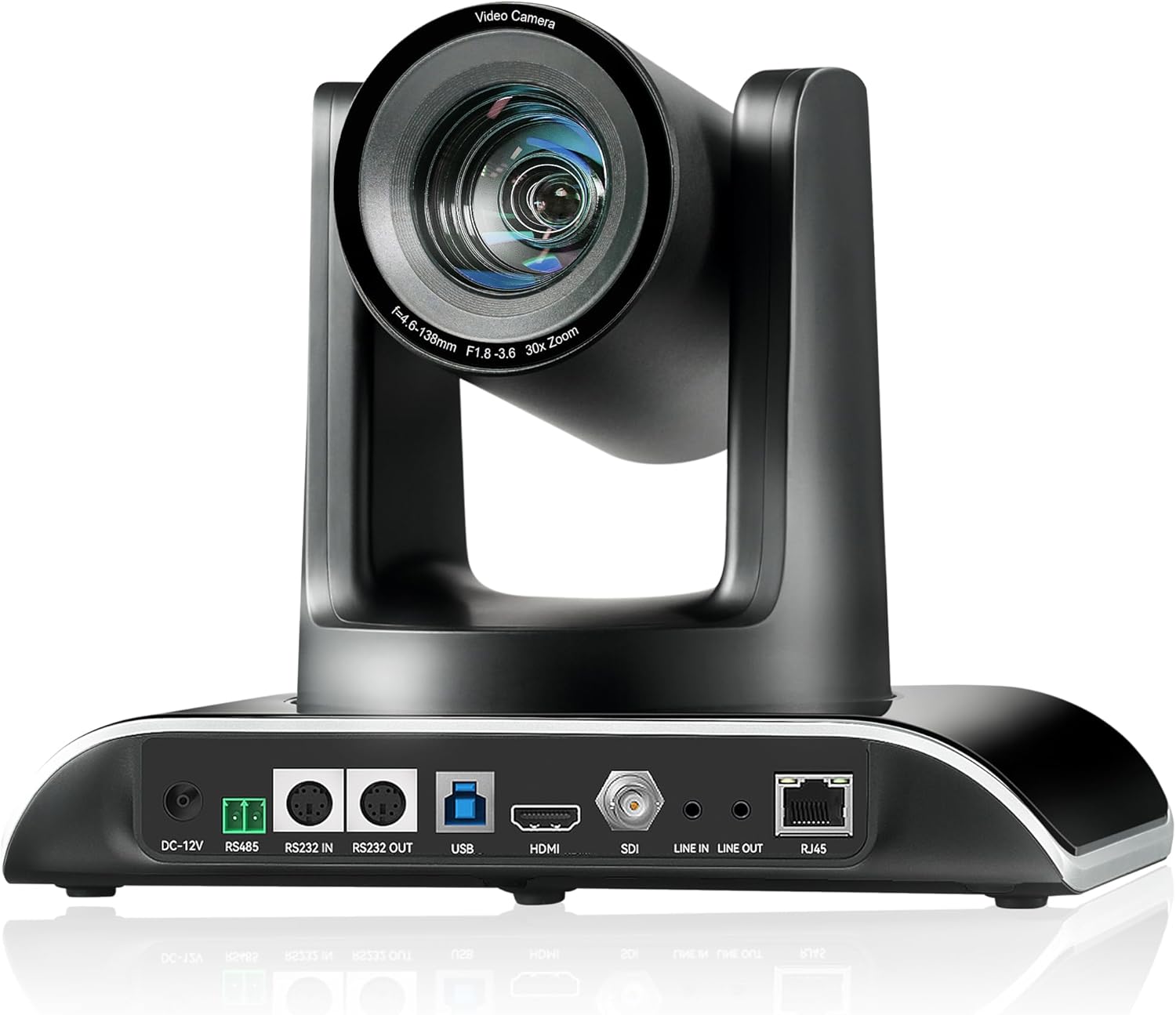
图 4.1: Tenveo VHD630A PTZ Camera Rear Panel. This image displays the rear panel of the camera, highlighting its connectivity ports including DC-12V power input, RS485, RS232 IN/OUT, USB, HDMI, SDI, Line IN/OUT audio, and RJ45 (PoE) for network and power.
主要特点:
- 光学变焦: 30X optical zoom with 8X digital zoom.
- 解决: Up to 1080p at 60fps.
- AI自动跟踪: Automatically detects and tracks subjects.
- 视频输出: SDI, HDMI, USB3.0, RJ45 (PoE) IP.
- 广泛的领域 View: 69.5° FOV.
- 以太网供电 (PoE): 支持标准PoE供电。

图 4.2: Tenveo PTZ Camera Feature Overview. This graphic visually summarizes the camera's capabilities, including 30X optical zoom, 69.5° wide FOV, PoE support, IR remote control, OSD menu, auto/manual focus, live streaming capability, AI tracking and auto framing, 1080P 60FPS video, and multiple video output options (USB3.0, HDMI, RJ45, SDI).
4.2 Tenveo KB200 PTZ Controller
The KB200 is a 4D joystick controller designed for precise control over PTZ camera movements. It supports both network and analog control modes and is compatible with various protocols.

图 4.3: Tenveo KB200 PTZ Controller. This image shows the top panel of the controller, featuring the 4D joystick, various control buttons for pan, tilt, zoom, focus, exposure, white balance, and a numeric keypad for preset recall.
主要特点:
- 控制模式: Network and Analog.
- 协议: Supports VISCA, VISCA over IP, PELCO-P, PELCO-D.
- 操纵杆: High-quality 4D joystick for variable speed control.
- 快捷按钮: Up to 7 shortcut buttons for quick operations.
5. 设置
5.1 物理连接
Connect the camera and controller using the appropriate cables based on your desired setup. The VHD630A camera offers multiple output options:
- SDI: For professional video mixers and long cable runs.
- HDMI: For direct connection to displays or capture cards.
- USB3.0: For direct connection to a computer for video conferencing or streaming software.
- RJ45(PoE): For network connectivity and power via a single Ethernet cable (requires PoE-enabled switch or injector).
The KB200 controller connects to the camera via RS232, RS485, or Ethernet (RJ45).

图 5.1: Camera Connection Methods. This diagram illustrates various connection setups for the PTZ camera, including USB PTZ Camera to PC, Ethernet PTZ Camera to Network Switch to PC, HDMI PTZ Camera to Blackmagic ATEM HDMI to PC, and SDI PTZ Camera to Blackmagic ATEM SDI to PC, all leading to YouTube/Facebook Live streaming.

图 5.2: Network and Analog Control Modes. This image demonstrates how a conference camera, dome camera, or PTZ camera can be connected via cable to a network switch, which then connects to the KB200 controller, supporting Power over Ethernet (PoE).

图 5.3: KB200 Controller Rear Connections. This image details the rear panel of the KB200 controller, labeling ports such as RS232, RS422, Ethernet (RJ-45 PoE), USB (for upgrading), DC12V power interface, and the power switch.
5.2安装选项
The VHD630A camera supports desktop, monitor, wall, or ceiling mounting. A wall mount bracket and screws are included in the package. Ensure the mounting surface is sturdy enough to support the camera's weight.
5.3网络配置
For network control and IP streaming, connect the camera's RJ45 port to your network. If using PoE, ensure your network switch or injector provides PoE power. The KB200 controller can also be connected to the network for IP control of multiple cameras.
6. Operating the Camera (VHD630A)
6.1 基本控制
The camera's pan, tilt, and zoom functions can be controlled via the KB200 joystick controller or compatible software. Adjust focus manually or use the auto-focus feature.
6.2 AI自动跟踪
Activate the AI Auto Tracking feature to automatically detect and follow a designated subject. This ensures the subject remains centered and in focus without manual intervention. Refer to the camera's OSD menu for specific AI tracking settings.

图 6.1: AI Tracking Auto Framing in Use. This image demonstrates the AI tracking feature, where the camera automatically frames a speaker during a presentation, keeping them in the center of the shot.
6.3 Video Output Modes
Select the appropriate video output (SDI, HDMI, USB3.0, or IP) based on your streaming or recording setup. The camera can output 1080p at 60 frames per second for high-quality video.
7. Operating the Controller (KB200)
7.1 操纵杆功能
The 4D joystick provides intuitive control over camera pan, tilt, and zoom. Push the joystick in different directions to pan and tilt, and twist it to control zoom speed. The joystick also allows for variable speed control for smooth camera movements.
7.2 预设管理
The KB200 controller allows you to save and recall camera presets. Position the camera to a desired view, then use the preset buttons to store the position. You can then recall these positions quickly during operation.

图 7.1: KB200 Controller Feature Overview. This graphic highlights the controller's key attributes: PoE Support, Multi Interface Control (RS422, RS232, RJ45), Protocols (VISCA, VISCA over IP, PELCO-P, PELCO-D), High-Quality 4D joystick, Two Control Modes (Network and Analog), and up to 7 shortcut control buttons.
7.3 协议支持
The controller supports VISCA, VISCA over IP, PELCO-P, and PELCO-D protocols, ensuring compatibility with a wide range of PTZ cameras and control systems. It can operate in both network and analog control modes, with independent IP addresses in network mode.
8. 维护
8.1 清洁
Gently wipe the camera lens and body with a soft, dry cloth. For stubborn marks, use a slightly damp 用布擦拭,然后彻底晾干。避免使用刺激性化学品或研磨性材料。
8.2固件更新
Periodically check the Tenveo website for firmware updates to ensure your camera and controller have the latest features and performance enhancements. Follow the provided instructions for firmware installation.
9。 故障排除
如果遇到问题,请参考以下常见问题及解决方法:
- 无电源: Ensure all power cables are securely connected and power outlets are active. Check the power adapters.
- 无视频输出: Verify cable connections (HDMI, SDI, USB, Ethernet). Ensure the correct input source is selected on your display or capture device. Check camera settings.
- 控制器无响应: Check the control cable connections (RS232, RS485, Ethernet). Ensure the controller and camera are on the same network if using IP control. Verify protocol settings.
- 人工智能追踪问题: Ensure the subject is clearly visible and well-lit. Avoid rapid, erratic movements. Check tracking sensitivity settings in the OSD menu.
- 图像质量问题: Check lighting conditions. Ensure the lens is clean. Adjust exposure and white balance settings.
For further assistance, contact Tenveo technical support.
10. 规格
Tenveo VHD630A PTZ Camera
- 视频捕捉分辨率: 1080p
- 光学变焦: 30倍
- 数码变焦: 8x
- 传感器: 1/2.8英寸CMOS
- 连接技术: HDMI, USB, SDI, RJ45 (PoE)
- 视频捕捉格式: MP4, MOV
- 兼容设备: Blackmagic Design ATEM, Facebook Live, OBS, Professional Video Mixer, Skype, Teams, YouTube, Zoom, vMix
Tenveo KB200 PTZ Controller
- 控制模式: Network, Analog
- 支持的协议: VISCA, VISCA over IP, PELCO-P, PELCO-D
- 操纵杆: 4D
- 界面: RS232, RS422, Ethernet (RJ45), USB
11. 保修和支持
Tenveo offers a 3-year warranty and lifetime technical support service, including firmware upgrades. If you have any questions or require assistance, please contact Tenveo customer service. They aim to reply within 24 hours and provide a satisfactory solution.
For support, visit the official Tenveo web请访问网站或参考产品文档中提供的联系信息。


